Best AI chart analysis apps for iPhone (2026)
Also available in: Español · Italiano
Our pick, and the best overall, is Wick. Upload a screenshot of any chart and it returns a complete, two-sided read: the trend, support and resistance, the chart pattern, a bullish and a bearish scenario each with its own probability and risk-reward, and a trade plan with the trigger, entry, stop loss and target, with no account needed. The other apps each specialize: Trade AI has the most ratings, Profit AI syncs a trading journal from your broker, TradeGPT leans on indicators, ChartDetector AI adds lessons and news, and Chart AI Pro adds an AI chat. We make Wick, so below we explain how we compared them.
How we compared them
We make Wick, so we are not neutral. Everything we say about the other apps comes from their own App Store listings and Apple's public data, checked on the US App Store on 21 October 2026. Apps change often, so check a listing before you subscribe.
We looked at what a trader actually gets from one chart screenshot:
- Both sides of the trade: a bullish and a bearish scenario, each with a probability, not a single call.
- A complete plan: the trigger to wait for, the entry, the stop loss, the target and the risk-reward between them.
- Clear reasoning: what the pattern is and why the levels matter, in plain language.
- Reliability: it should analyze real charts only, and never invent an analysis from an unrelated image.
- Any chart: screenshots or photos from MetaTrader, TradingView or a broker app, for any market and timeframe.
- Easy to start: no account to create, in your own language.
The apps at a glance
| App | Best for | What you get from a chart | Extras | Languages |
|---|---|---|---|---|
| Wick | Best overall: a complete, two-sided read and a ready trade plan | Signal with confidence and risk level, support, resistance and stop, the chart pattern explained, bullish and bearish scenarios each with probability and risk-reward, a plan with trigger, entry, stop and target | Shareable report, chart journal, analysis tuned to your trading style, no account | 6 |
| Trade AI | The most ratings | Patterns, trend, indicators, support and resistance | Insights tailored to your strategy | 27 |
| Profit AI | Syncing a trading journal | Trend, patterns, entry and exit, stop loss and take profit zones, risk notes | Broker-synced journal, strategy builder, web app, lessons, news | 1 (English) |
| TradeGPT | Indicator-focused traders | Candlestick patterns, support and resistance, RSI, MACD, Bollinger Bands, Fibonacci, bullish and bearish setups with risk-reward | Setups for day and swing trading | 11 |
| ChartDetector AI | Lessons and market news | Trends, patterns, support and resistance, indicators | Trading academy with quizzes, daily news briefing | 7 |
| Chart AI Pro | Chatting about markets | Patterns, entry and exit points, support and resistance, candlestick formations | AI chat, AI search for opportunities | 32 |
All six are iPhone apps that sell a subscription for full use. Prices vary by country and change often, so compare them in the App Store.
1. Wick: best overall (our pick)
Wick is built around one idea: every chart has two sides, and you should see both before you trade. Upload a screenshot or photo of any candlestick, bar or line chart and Wick returns a structured report in seconds: the instrument, price and trend, an overall signal with a confidence score and a risk level, support, resistance and a stop, the chart pattern explained in plain English, and a bullish and a bearish scenario, each with its own probability, entry, target, stop and risk-reward.
Then it turns the stronger case into a plan you can follow: the trigger to wait for, the entry, the stop and the target, with a reminder to wait for confirmation before entering.
- Both sides, weighed: a probability for the bullish and the bearish case shows how one-sided the chart really is.
- A plan, not just a signal: the trigger, entry, stop and target, with the risk-reward already worked out.
- Real charts only: if an image is not a trading chart, Wick says so instead of inventing an analysis.
- Tuned to you: choose day or swing trading, aggressive or conservative, and the analysis follows.
- Every analysis is saved to a journal, and any of them becomes a clean report you can share in a tap.
- Reads MetaTrader, TradingView and broker app screenshots for stocks, crypto, forex, gold and indices, from 1-minute to weekly charts, with no account and in six languages.
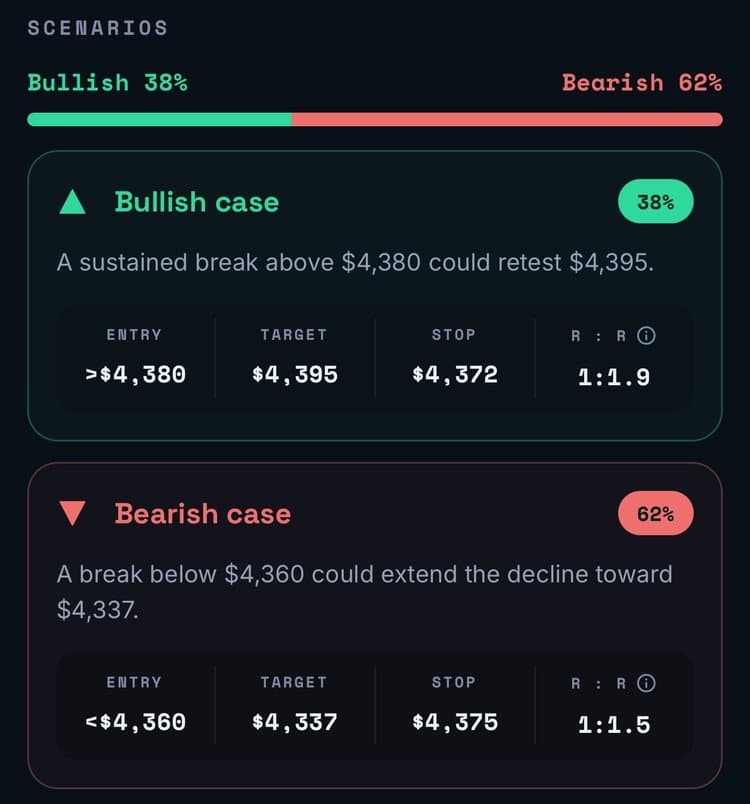
A real Wick analysis, start to finish
This is the complete analysis Wick returned for a 4-hour Bitcoin chart on 8 October 2026. Every chart gets the same structure, so setups are easy to compare side by side.
- Resistance
- $84,000
- Support
- $82,000
- Stop loss
- $83,300
Price is making lower highs below the EMA 50, favoring continuation toward support.
Indicators: EMA 50, EMA 200
A reclaim above $84,000 could target $86,000, invalidating the immediate bearish structure.
- Entry
- >$84,000
- Target
- $86,000
- Stop
- $83,200
- R:R
- 1:2.5
A break below $82,000 could extend the decline toward $80,000 near the next structural support.
- Entry
- <$82,000
- Target
- $80,000
- Stop
- $83,300
- R:R
- 1:1.5
- Trigger
- 4H close below $82,000
- Entry
- Failed retest near $82,000
- Stop
- Above $83,300
- Target
- $80,000
2. Trade AI: the most ratings
Trade AI, by Leadimize, has the most App Store ratings in the category, about 10,000 on the US store. According to its listing, you upload or photograph a stock, forex or crypto chart, and it scans for patterns, trends and indicators such as support and resistance, moving averages and price action, then gives insights tailored to your trading strategy. It is available in 27 languages.
3. Profit AI: for syncing a trading journal
Profit AI pairs chart analysis with trading tools. Its listing describes example entry and exit levels, stop loss and take profit zones, plus a journal that syncs trades from MetaTrader 5, cTrader, Interactive Brokers, Binance and other platforms, a strategy builder, a web app, lessons and optional news analysis. The app is in English only.
4. TradeGPT: for indicator-focused traders
TradeGPT, by Eversight Studio, leans on indicators. Its listing describes candlestick pattern and trend line detection, support and resistance, RSI, MACD, moving averages, Bollinger Bands and Fibonacci levels, plus bullish and bearish setups with entry zones, stop loss, targets and risk-reward for day and swing trading. It is available in 11 languages.
5. ChartDetector AI: for lessons and market news
ChartDetector AI combines chart analysis with a trading academy of short lessons and quizzes, and a daily briefing that summarizes market and company news. Its listing describes the analysis as identifying trends, patterns, support and resistance and indicators. It is available in 7 languages.
6. Chart AI Pro: for chatting about markets
Chart AI Pro, by SAFE AI Network, pairs photo-based chart analysis with a built-in AI chat for questions about indicators, strategies and news, and an AI search for trading opportunities. According to its listing, the analysis covers patterns, entry and exit points, support and resistance and candlestick formations. It is available in 32 languages.
Can you just use ChatGPT?
Yes, up to a point. ChatGPT and other general AI assistants can read a chart screenshot and describe what they see. The difference is structure: a general assistant answers whatever you ask, so you have to write a good prompt every time, and the answer comes back in a different shape each time.
A dedicated app like Wick runs the same complete analysis on every chart, with the levels, the pattern, both scenarios and a plan in the same layout. That makes setups easy to compare, and they are saved to your journal instead of getting lost in a chat history.
How to choose
- Not sure where to start? Start with Wick, our pick for most traders: a complete, two-sided read and a ready plan from one screenshot.
- You want the app with the most reviews: Trade AI.
- You want your broker's trades journaled automatically: Profit AI.
- You read charts mainly through indicators: TradeGPT.
- You want lessons and market news in the same app: ChartDetector AI.
- You want to chat with an AI about markets: Chart AI Pro.
Whichever you choose, test it on a chart you already know well, check that it reads the price axis correctly, and treat every analysis as a second opinion rather than a signal.
Learn to read an AI chart analysis
- How to analyze a trading chart with AIHow AI chart analysis works: screenshot any trading chart, upload it, and read the trend, key levels, both scenarios and a trade plan. With real examples.
- Entry, stop loss and target: how to read a trade planWhat the trigger, entry, stop loss, target and risk-reward ratio mean in a trade plan, with a worked gold example and the arithmetic behind 1:1.5.
- How to analyze a gold (XAUUSD) chart with AIScreenshot your XAUUSD chart, upload it to an AI chart analysis app, and read the trend, key levels, scenarios and trade plan it returns. A real example.
- ChatGPT prompts for trading chart and technical analysisCopy-ready ChatGPT prompts to analyze a trading chart screenshot: trend, key levels, patterns, both scenarios and a trade plan, plus how to check the answer.
Frequently asked questions
What is the best AI chart analysis app?
For most traders, we recommend Wick (we make it): from one screenshot it returns the trend, key levels, the chart pattern, both scenarios with probabilities and a ready trade plan. If you need something specific, Trade AI has the most ratings, Profit AI syncs a journal from your broker, and TradeGPT focuses on indicators.
Can ChatGPT analyze trading charts?
Yes. ChatGPT can read a chart screenshot and describe it, but the result depends on your prompt and changes shape each time. Dedicated apps such as Wick run the same structured analysis on every chart, with key levels, both scenarios and a trade plan.
Are AI chart analysis apps accurate?
They are useful but not always right. An AI only sees what is on the screenshot, not the news behind a move, and its probabilities are estimates. Use the analysis as a second opinion and confirm the key levels yourself.
Which charts can these apps read?
Screenshots or photos of candlestick, bar and line charts from MetaTrader, TradingView and broker apps. Wick works with stocks, crypto, forex, gold and indices, on any timeframe from 1 minute to weekly.
Educational content, not financial advice. Trading involves risk, including the loss of your capital. AI analysis can be wrong; always do your own research. Read the full disclaimer.