How to analyze a stock chart with AI
Screenshot the stock's chart in TradingView, your broker's app or any charting platform, keeping the price axis in view, and open it in an AI chart analysis app like Wick. Within seconds you get the stock's trend, its nearest support and resistance, any chart pattern, an upside and a downside case each weighted by probability, and a sample plan with entry, stop and target. Before acting on it, check two things a single stock chart cannot show: the next earnings date and the direction of the wider market.
What you need
Just the stock chart on your screen and an app that can read it. The examples here use Wick, which runs on iPhone and handles US and international shares, ETFs and indices as well as other markets. You do not need to sign up for anything.
- A chart from any source: TradingView, a brokerage app, or even a photo taken of your monitor
- Daily and weekly charts for swing trading, or intraday charts for day trading
- A visible price axis. Some broker apps hide it on their simple chart view, so open the full chart before taking the screenshot
New to AI chart analysis?
Start with the general guide, which covers every step from screenshot to finished report. Everything below is specific to shares.
- How to analyze a trading chart with AIHow AI chart analysis works: screenshot any trading chart, upload it, and read the trend, key levels, both scenarios and a trade plan. With real examples.
What is different about stock charts
Stocks trade on exchanges with fixed hours, which shapes how their charts look and how an analysis should be read:
- Gaps. A stock can open far from the previous close after news overnight or over the weekend. Daily charts show these as gaps, and a level inside a gap is often weak.
- Earnings. Quarterly results can move a stock more in one day than in the previous month. A chart cannot show the date, so check it before acting on a setup.
- Volume. Exchange volume is a real count of shares traded, so it carries more weight than the tick volume on forex charts. A breakout on rising volume is stronger than one on falling volume.
- The 50-day and 200-day moving averages. So many traders and funds watch them that price tends to react when it reaches them on a daily chart.
- The market. Most stocks move with their index, so a setup that fights a falling S&P 500 or Nasdaq is harder to trust.
A real example: NVIDIA (NVDA) on the daily chart
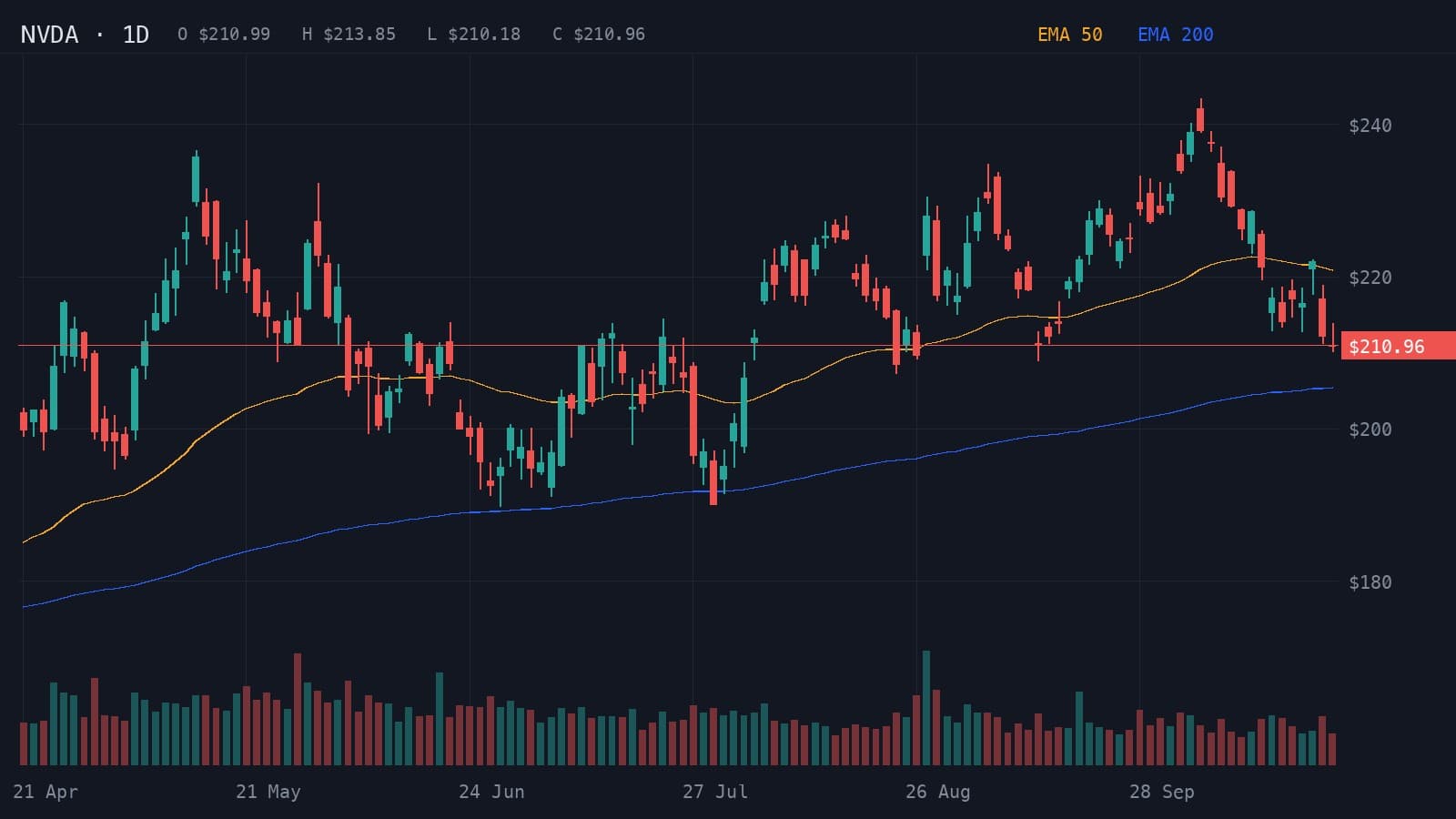
Below is a daily NVIDIA (NVDA) chart from April to 23 October 2026, with the 50- and 200-day EMAs and volume, followed by Wick's report on it. NVDA had pulled back from a high near $240 to $210.96, below its 50-day EMA but still above a rising 200-day EMA.
- Resistance
- $220.00
- Support
- $205.00
- Stop loss
- $215.00
Price is correcting below the 50-day EMA while remaining above a rising 200-day EMA.
Indicators: EMA 50, EMA 200
A daily close above $220 could resume the advance toward $235.
- Entry
- >$220.00
- Target
- $235.00
- Stop
- $215.00
- R:R
- 1:3
A break below $205 could expose the $195 area.
- Entry
- <$205.00
- Target
- $195.00
- Stop
- $211.00
- R:R
- 1:1.7
- Trigger
- Daily close above $220
- Entry
- Successful retest near $220
- Stop
- Below $215
- Target
- $235
Wick called it a pullback within an uptrend and leaned only slightly bullish, 54% to 46%, with 72% confidence. That near-even split is the honest read of this chart: the trend is still up, but price has lost its 50-day EMA. The plan becomes a long setup only if NVDA closes back above $220, with a target of $235 and a stop below $215, a risk-reward of 1:3. If it breaks $205 instead, close to the 200-day EMA, the bearish case toward $195 takes over.
Note what the analysis does not do: it does not say buy now. Both cases wait for price to confirm them first.
Daily or intraday?
Pick the timeframe that matches how long you plan to hold:
- Daily and weekly charts suit swing trades that last days to weeks. They filter out intraday noise, and the 50-day and 200-day averages mean the most here.
- Hourly and 15-minute charts suit day trades. Levels sit closer together, and the first and last hour of the session are usually the busiest.
- Analyzing the daily chart first, then the intraday one, tells you whether a short-term setup agrees with the bigger trend.
Tips for stock charts
- Decide whether your chart includes pre-market and after-hours trading. Extended-hours candles can move where support and resistance appear, so use the same setting every time.
- Compare the stock with its index, for example SPY for the S&P 500 or QQQ for the Nasdaq 100. Analyzing both shows whether the stock is leading or lagging the market.
- Keep the volume panel on the chart. Wick reads the volume trend along with price, which helps judge whether a move has real participation.
- A gap or an earnings release can redraw the whole chart overnight, so analyze a fresh screenshot afterwards rather than relying on yesterday's read.
Related guides
- Entry, stop loss and target: how to read a trade planWhat the trigger, entry, stop loss, target and risk-reward ratio mean in a trade plan, with a worked gold example and the arithmetic behind 1:1.5.
- Best AI chart analysis apps for iPhone (2026)The AI chart analysis apps for iPhone compared: Wick, Trade AI, Profit AI, TradeGPT, ChartDetector AI and Chart AI Pro, and whether ChatGPT can do the same.
Frequently asked questions
Can AI analyze stock charts?
Yes. Upload a screenshot of a share price chart to Wick and it identifies the trend, the support and resistance levels, any pattern, the upside and downside cases with their odds, and a sample plan. US and international shares, ETFs and indices all work. Treat the result as education, not a recommendation to buy or sell.
Which timeframe is best for analyzing stocks with AI?
The one you trade. Daily charts suit swing trades and show the widely watched 50-day and 200-day moving averages, while hourly and shorter charts suit day trades. Wick works on any timeframe.
Does it work with screenshots from my broker's app?
Yes, as long as the candles and the price axis are visible. Some broker apps show a simplified line chart without a price axis, so switch to the full chart view, or use TradingView, before taking the screenshot.
Can AI predict stock prices?
No. Earnings surprises, news and the mood of the whole market are not on the chart, and no one can forecast share prices reliably. What an AI read gives you instead is a set of if-then cases: which price action would back a rise or a fall, and which level would prove each case wrong.
Does the AI take volume into account?
Wick reads the volume shown on the chart and reports whether it is rising, falling or spiking, alongside the price levels. Keep the volume panel visible to get that part of the analysis.
Educational content, not financial advice. Trading involves risk, including the loss of your capital. AI analysis can be wrong; always do your own research. Read the full disclaimer.