Best apps for stock analysis with AI (2026)
For analyzing a stock chart, our pick is Wick: upload a screenshot of any stock chart and it returns the trend, support and resistance, the chart pattern, a bullish and a bearish scenario with probabilities, and a trade plan with entry, stop and target. Stock analysis has a second half, though: the business behind the chart. For that, Seeking Alpha and TipRanks collect research and analyst ratings, and AInvest adds an AI stock screener. TradingView is the standard for drawing your own charts, while Trade AI and TradeGPT are other AI chart analyzers. We make Wick, and below we explain how we compared them.
Two kinds of stock analysis
Before picking an app, decide which question you are asking:
- Technical analysis reads the chart: the trend, support and resistance, patterns and momentum. It answers when to buy or sell and where you would be wrong, and it suits traders holding for days or weeks.
- Fundamental analysis reads the business: earnings, valuation, analyst ratings and news. It answers what to own, and it suits investors holding for months or years.
Apps tend to specialize in one of the two. Wick is built for the first: it turns a stock chart into a complete technical read in seconds.
How we compared them
We make Wick, so we are not neutral. Everything about the other apps comes from their own App Store listings and Apple's public data, checked on the US App Store on 26 October 2026. For the chart apps we looked at what you get from a single chart; for the research apps, at the data and coverage they offer.
The apps at a glance
| App | Best for | Type of analysis | What it gives you |
|---|---|---|---|
| Wick | Best overall for analyzing a stock chart | AI chart analysis | Trend, support and resistance, the chart pattern, bullish and bearish scenarios with probabilities, and a plan with trigger, entry, stop and target, from one screenshot |
| TradingView | Drawing your own charts | Charting platform | Charts for stocks and other markets, drawing tools, technical indicators, alerts and a trading community |
| Seeking Alpha | In-depth research and news | Research and news | Market news and analysis, stock ratings, earnings reports and transcripts, and investor articles |
| TipRanks | Analyst ratings | Analyst research | What Wall Street analysts and experts think, data-driven stock scores, news and portfolio analysis |
| AInvest | Screening for ideas with AI | AI screener and assistant | AI stock screening, an AI assistant that explains moves and compares companies, signals and alerts |
| Trade AI | AI chart reads, most-rated app | AI chart analysis | Patterns, trend, indicators, support and resistance from a chart image |
| TradeGPT | Indicator-heavy chart reads | AI chart analysis | Candlestick patterns, support and resistance, RSI, MACD, Fibonacci, bullish and bearish setups with risk-reward |
All of them sell subscriptions for their full features. Prices vary by country and change often, so compare them in the App Store.
1. Wick: best for analyzing a stock chart (our pick)
Wick does one job: it reads the chart you are looking at and tells you what it shows. Upload a screenshot of a daily chart for a swing trade or an intraday chart for a day trade, and within seconds you get the trend, the support and resistance that matter, the chart pattern explained in plain English, an upside and a downside case with their odds, and a plan for the stronger one.
- Any chart you already use: TradingView, your broker's app or a photo of your screen, on any timeframe.
- Both directions, weighted: an upside and a downside case with probabilities, so you see how strong the setup really is.
- A plan with a trigger: the price that has to break before the trade is on, plus the entry, stop, target and risk-reward.
- It reads what is on the chart, including the moving averages and the volume trend.
- Every analysis is saved to a journal and can be shared as a report.
- No account needed, in six languages.
A real example: Apple (AAPL) on the daily chart
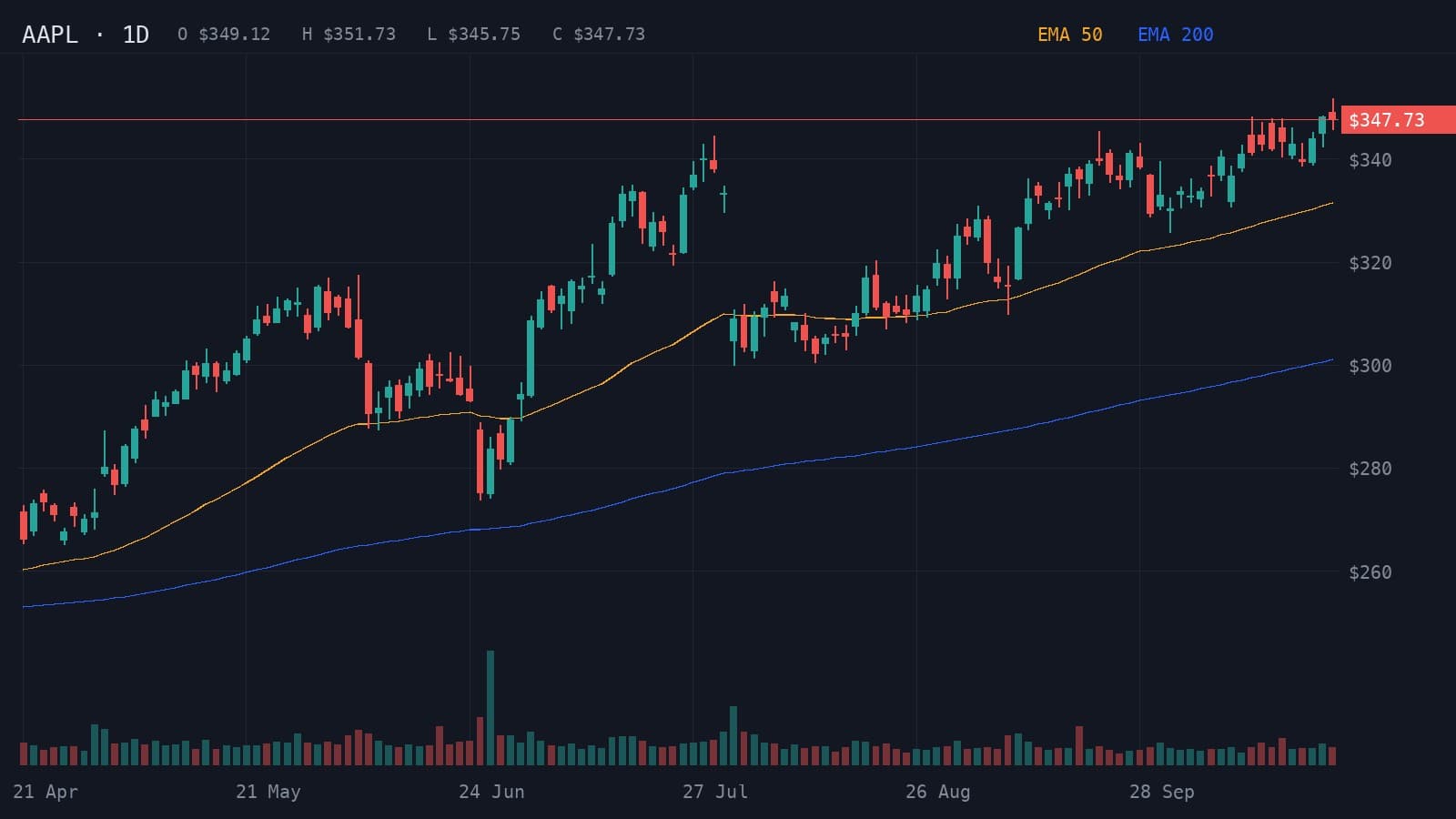
Here is what Wick returned for a daily Apple chart from April to 23 October 2026. AAPL had climbed about 30% in six months and was trading at $347.73, just under its recent high, above both of its rising EMAs.
- Resistance
- $351.73
- Support
- $340.00
- Stop loss
- $345.00
Higher highs and higher lows persist above rising EMA 50 and EMA 200.
Indicators: EMA 50 and EMA 200
A daily close above $351.73 could extend the advance toward $362.
- Entry
- >$351.73
- Target
- $362.00
- Stop
- $345.00
- R:R
- 1:1.5
A break below $340 could trigger a pullback toward $330.
- Entry
- <$340.00
- Target
- $330.00
- Stop
- $344.00
- R:R
- 1:2.5
- Trigger
- Daily close above $351.73
- Entry
- Successful retest near $351.73
- Stop
- Below $345
- Target
- $362
Wick read an ascending trend channel and leaned bullish, 68% to 32%, with 79% confidence. It placed resistance at $351.73, the recent high, and support at $340. The plan is a long only on a daily close above $351.73, aiming for $362 with a stop below $345. A break below $340 would favor a pullback toward $330 instead.
That is what a chart read adds to research: where the trade is, and where it is wrong.
2. TradingView: best for drawing your own charts
TradingView is one of the most widely used charting apps, with more than 400,000 ratings on the US App Store. Its listing describes charts for stocks, currencies, crypto and futures, a large set of drawing tools and technical indicators, alerts, Pine Script for building custom tools, and a community of traders. It gives you the tools to analyze a chart yourself. The two fit together well: take the screenshot in TradingView, then let Wick read it. TradingView is available in 19 languages.
3. Seeking Alpha: best for in-depth research
Seeking Alpha is a research and news platform. Its listing describes real-time financial news and analysis, its 'Strong Buy' ratings, coverage of more than 1,300 stocks that Wall Street analysts do not follow, earnings reports, transcripts and filings, and articles from thousands of contributors. Its focus is research on the companies themselves. It is available in 9 languages.
4. TipRanks: best for analyst ratings
TipRanks gathers what Wall Street analysts and other experts think about a stock. According to its listing, it offers analyst opinions and top-rated picks, a data-driven score for each stock, news and research on your watchlist, and portfolio analysis. The app is in English only.
5. AInvest: best for screening stocks with AI
AInvest's app, listed as Stock Screener, AI Scanner GPT, pairs an AI stock screener with Aime, an assistant that, according to its listing, explains stock moves, summarizes news, compares companies and reviews trades, plus signals and alerts. Its focus is finding and researching stock ideas. It is available in 33 languages.
6. Trade AI and TradeGPT: other AI chart analyzers
Trade AI, by Leadimize, and TradeGPT, by Eversight Studio, also analyze chart images, for stocks as well as forex and crypto. Trade AI's listing focuses on patterns, trends and indicators such as support, resistance and moving averages. TradeGPT's leans on indicators, adding RSI, MACD, Bollinger Bands and Fibonacci levels to bullish and bearish setups. Our comparison of AI chart analysis apps covers both in detail.
- Best AI chart analysis apps for iPhone (2026)The AI chart analysis apps for iPhone compared: Wick, Trade AI, Profit AI, TradeGPT, ChartDetector AI and Chart AI Pro, and whether ChatGPT can do the same.
How to choose
- You trade from charts and want a complete read with a plan, fast: Wick.
- You want to draw and study charts yourself: TradingView, ideally alongside Wick.
- You invest for the long term and want research on the business: Seeking Alpha or TipRanks.
- You are looking for new stock ideas: AInvest's AI screener.
Many traders pair one research app with one chart tool: the research decides what to watch, the chart decides when to act.
Analyze your next stock chart with Wick
Open any stock in TradingView or your broker's app, take a screenshot and upload it to Wick. In seconds you get the trend, the levels that matter, both scenarios with their odds and a plan with the trigger, entry, stop and target, ready to size with the position calculator.
Related guides
- How to analyze a stock chart with AIScreenshot any stock chart, upload it to an AI chart analysis app and read the trend, levels, scenarios and plan. With a real NVIDIA (NVDA) daily example.
- ChatGPT prompts for trading chart and technical analysisCopy-ready ChatGPT prompts to analyze a trading chart screenshot: trend, key levels, patterns, both scenarios and a trade plan, plus how to check the answer.
- Position size calculator for forex, gold, indices and stocksCalculate how many lots or shares to trade from your account size, risk per trade, entry and stop loss. Works for forex, gold, indices, crypto and stocks.
Frequently asked questions
What is the best app for stock analysis?
It depends on the kind of analysis. For analyzing a stock chart we recommend Wick (we make it): one screenshot returns the trend, key levels, both scenarios and a trade plan. For research on the business, Seeking Alpha and TipRanks are strong, and TradingView is the standard for drawing your own charts.
Can AI analyze stocks?
Yes, in two ways. AI chart analysis apps such as Wick read a stock chart and lay out levels, scenarios and a plan. AI research tools such as AInvest's assistant summarize news, compare companies and screen for ideas. Neither can predict prices, so treat both as input to your own decision.
Which is better for stocks, technical or fundamental analysis?
They answer different questions. Fundamental analysis helps decide which companies are worth owning; technical analysis helps decide when to buy or sell and where you are wrong. Long-term investors lean on fundamentals, traders on charts, and many people use both.
Is there an app that analyzes a stock chart from a screenshot?
Yes. Wick analyzes a screenshot or photo of any stock chart, from TradingView, a broker app or any other platform, and returns a structured technical analysis. Trade AI and TradeGPT also analyze chart images.
Can I use ChatGPT for stock analysis?
ChatGPT can read a chart screenshot or summarize news when you give it a good prompt, but it starts from zero each time and its answers vary from one run to the next. Our guide to ChatGPT prompts for chart analysis shows how to get the most out of it.
Educational content, not financial advice. Trading involves risk, including the loss of your capital. AI analysis can be wrong; always do your own research. Read the full disclaimer.