Best AI apps for gold (XAUUSD) trading in 2026
For analyzing a gold chart, our pick is Wick: upload a screenshot of an XAUUSD or gold futures chart from MetaTrader, TradingView or your broker's app, and it returns the trend, support and resistance, the chart pattern, a bullish and a bearish scenario with probabilities, and a trade plan with the trigger, entry, stop and target. Trading gold takes a few tools, though. MetaTrader 5 is where many traders place XAUUSD orders through a broker, TradingView is the standard for drawing your own charts, Investing.com's economic calendar shows the US data that moves gold, and Kitco's Gold Live! covers gold prices and news. Wick is our app, and below we explain how we compared them.
The apps a gold trader actually uses
Gold is rarely traded from a single app. Most traders cover four jobs:
- Placing the trade: a broker account, usually through MetaTrader 5 or the broker's own app.
- Watching the chart: live candles, indicators and alerts on spot gold or gold futures.
- Tracking the calendar: US inflation, jobs and Federal Reserve announcements, the releases behind gold's fastest moves.
- Reading the setup: where support and resistance are, which way the chart leans, and where a trade idea stops working. This is the job Wick does.
The list below has a strong app for each job, so you can put together a setup that covers all four.
How we chose them
Wick is our app, so weigh our pick with that in mind. For every other app we relied on its own App Store listing and Apple's public ratings data, checked on the US App Store on 28 October 2026. For each one we asked what it adds to a gold trade: execution, charts, the calendar, news, or a read of the chart itself.
The apps at a glance
| App | Best for | Its job in gold trading | Key features |
|---|---|---|---|
| Wick | Best overall for analyzing a gold chart | AI chart analysis | Trend, support and resistance, the pattern, bullish and bearish scenarios with probabilities, and a plan with trigger, entry, stop and target, from a screenshot of XAUUSD or gold futures |
| MetaTrader 5 | Trading XAUUSD with a broker | Trading platform | Live quotes, every order type, 30 indicators, nine timeframes from 1 minute to monthly, demo trading, hundreds of brokers |
| TradingView | Charting gold yourself | Charting platform | Charts for currencies, futures and CFDs, drawing tools, indicators, Bar Replay, alerts, paper trading |
| Investing.com | Following the economic calendar | Market data and calendar | Economic calendar filtered by impact, central bank and inflation dates, news, data on 300,000+ instruments |
| Kitco Gold Live! | Gold prices and news | Precious metals news | Gold and silver quotes in several currencies, Kitco News, the Kitco Gold Index, alerts and widgets |
| Gold Pattern | Studying gold chart patterns | Charts and pattern statistics | XAUUSD and London bullion charts, historical pattern statistics, economic calendar, alerts |
Plans and prices differ from app to app and from country to country, so check each listing in the App Store before you subscribe.
1. Wick: best for analyzing a gold chart (our pick)
Wick turns the gold chart you already have open into a complete read. Take a screenshot in MetaTrader, TradingView or your broker's app, upload it, and Wick returns the direction of the trend, the levels price is reacting to, the chart pattern in plain English, a bullish and a bearish case each with its own probability, and a plan for the stronger case.
- Spot or futures: it reads XAUUSD, GOLD and gold futures (GC) charts, whatever your broker calls the symbol.
- Prices in dollars, measured on the price scale of your own screenshot, so they match the quotes you trade on.
- Every timeframe from 1 minute to weekly: check the daily chart for direction, then the 5- or 15-minute chart for timing.
- A trigger before every trade: the price gold has to close beyond first, plus the entry, stop, target and risk-reward.
- Built to pair with the XAUUSD lot size calculator: take the stop from Wick and size the position in seconds.
- Each read is saved to your journal, with no account needed, in six languages.
A real example: gold futures on the daily chart
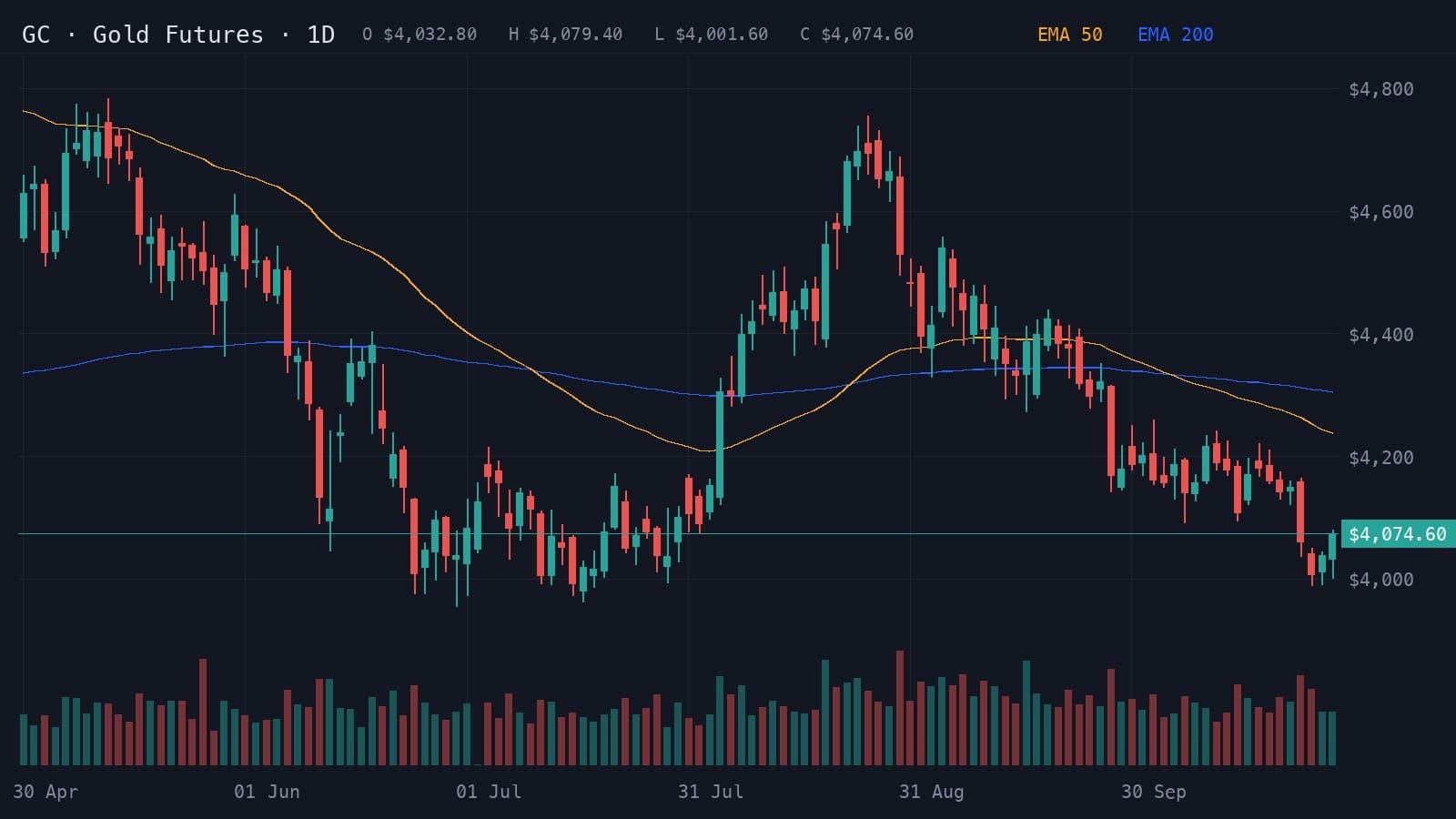
Here is Wick's analysis of a daily gold futures chart from May to 27 October 2026. Gold had fallen from a late-August high of $4,755 to just above $4,000, the same area that held as support in June and July, with price below both of its EMAs.
- Resistance
- $4,200.00
- Support
- $4,000.00
- Stop loss
- $4,075.00
Lower highs and lower lows favor continued downside while price remains below $4,200.
Indicators: EMA 50, EMA 200
A daily close above $4,200 could target $4,320 and challenge the moving averages.
- Entry
- >$4,200.00
- Target
- $4,320.00
- Stop
- $4,120.00
- R:R
- 1:1.5
A daily close below $4,000 could extend the decline toward $3,880.
- Entry
- <$4,000.00
- Target
- $3,880.00
- Stop
- $4,075.00
- R:R
- 1:1.6
- Trigger
- Daily close below $4,000
- Entry
- Failed retest near $4,000
- Stop
- Above $4,075
- Target
- $3,880
Wick read a descending channel and leaned bearish, 63% to 37%, with 78% confidence. The level that decided the trade was $4,000: a daily close below it would favor a drop toward $3,880, while the bullish case needed a daily close back above $4,200, aiming for $4,320 and the moving averages.
On a daily chart each scenario can take several sessions to play out, and the stop sits $75 from the entry rather than a few dollars. That makes sizing matter: risking $500 with a $75 stop allows 0.06 lots, since 500 ÷ (75 × 100) is about 0.067. The XAUUSD lot size calculator does the arithmetic for you.
2. MetaTrader 5: best for trading XAUUSD with a broker
MetaTrader 5, by MetaQuotes, is the platform many forex and gold brokers give their clients, with about 86,000 ratings on the US App Store. According to its listing, it connects to hundreds of brokers and offers live quotes, the full set of order types, 30 technical indicators, 24 analytical objects such as channels and Fibonacci tools, and nine timeframes from one minute to monthly, plus demo trading. It is available in 23 languages. A screenshot of a MetaTrader gold chart goes straight into Wick, so the two work side by side.
3. TradingView: best for charting gold yourself
TradingView, with more than 420,000 ratings on the US App Store, is where many traders draw their own charts. Its listing describes charts for currencies, futures and CFDs among other markets, drawing tools such as Gann fans and Elliott waves, technical indicators, Pine Script for custom tools, Bar Replay for rewinding past price action, cloud alerts and paper trading. For gold, that means you can follow spot gold and gold futures in one place. It is available in 19 languages.
4. Investing.com: best for the economic calendar
Gold reacts hard to US data, so the calendar matters as much as the chart. Investing.com's app, with about 38,000 ratings, has an economic calendar that, according to its listing, tracks central bank decisions, inflation reports and jobs data, filtered by country, impact and date, alongside news, analysis and real-time data on more than 300,000 instruments, commodities included. It is available in 22 languages. Check it before you act on a short-timeframe gold setup.
5. Kitco Gold Live!: best for gold prices and news
Kitco is a precious metals specialist, and its Gold Live! app, with about 8,400 ratings, is built around gold. Its listing describes live quotes for gold, silver and other metals in several currencies, news and commentary from Kitco News, price alerts and home-screen widgets, and the Kitco Gold Index, which separates moves in gold itself from moves in the US dollar. It is available in 6 languages.
6. Gold Pattern: for studying gold chart patterns
Gold Pattern is a gold-focused app with a smaller following, 37 ratings on the US store. According to its listing, it shows gold, London bullion and XAUUSD charts across timeframes with technical indicators, chart patterns with statistics on how often they occurred in the past, an economic calendar and alerts, and it presents its tools as research aids rather than forecasts. It is available in 17 languages.
What about AI gold signals and trading bots?
Search the App Store for gold and you will find many signal apps, which send buy and sell alerts for XAUUSD, and trading bots, often called Expert Advisors, which place trades automatically in MetaTrader. They answer a different question from chart analysis: they decide for you. Before relying on one, ask:
- Is the track record verified by an independent service, or only shown in screenshots?
- Does every alert come with a stop, so you know the loss if it is wrong?
- How did it do during sharp moves, such as a US inflation release or a Fed decision?
- Can you see why it took a trade, or only that it did?
Wick sends no alerts and places no trades. It shows you what the chart says and where each idea fails, and leaves the decision with you.
Other AI chart analysis apps
Two other apps read chart screenshots with AI: Trade AI, from Leadimize, and TradeGPT, from Eversight Studio. Both listings describe stock, forex and crypto charts. Trade AI centers on patterns, trend and key levels, TradeGPT on indicators like RSI, MACD and Fibonacci. Our AI chart app comparison sets them side by side with Wick.
- Best AI chart analysis apps for iPhone (2026)The AI chart analysis apps for iPhone compared: Wick, Trade AI, Profit AI, TradeGPT, ChartDetector AI and Chart AI Pro, and whether ChatGPT can do the same.
How to choose
- You want to know what a gold chart is telling you, with levels and a plan: Wick.
- You need to place XAUUSD trades: MetaTrader 5 with your broker, or your broker's own app.
- You like to draw your own lines and set alerts: TradingView.
- You trade around US data releases: keep Investing.com's calendar open.
- You follow gold as a market, not just a chart: Kitco's Gold Live! app.
A practical setup takes one app from each line: the calendar to know when, the chart to know where, Wick to read it, and the lot size calculator to size it.
Read your next gold chart with Wick
Open XAUUSD or gold futures in MetaTrader, TradingView or your broker's app, take a screenshot and upload it to Wick. It lays out the trend, gold's key levels, the bullish and bearish case with their odds, and a plan you can size straight away with the XAUUSD lot size calculator.
Related guides
- How to analyze a gold (XAUUSD) chart with AIScreenshot your XAUUSD chart, upload it to an AI chart analysis app, and read the trend, key levels, scenarios and trade plan it returns. A real example.
- XAUUSD lot size calculator: position size for goldWork out your gold (XAUUSD) lot size from your account, risk, entry and stop. How gold lots work, worked examples, and the formula behind the result.
- Best AI chart analysis apps for iPhone (2026)The AI chart analysis apps for iPhone compared: Wick, Trade AI, Profit AI, TradeGPT, ChartDetector AI and Chart AI Pro, and whether ChatGPT can do the same.
Frequently asked questions
What is the best AI app for gold trading?
For analyzing gold charts we recommend Wick (we make it): a screenshot of an XAUUSD or gold futures chart returns the trend, key levels, both scenarios with probabilities and a trade plan. To place trades you also need a platform such as MetaTrader 5, and many gold traders keep an economic calendar such as Investing.com's open.
Can AI analyze XAUUSD charts?
Yes. Apps such as Wick read a screenshot of a spot gold or gold futures chart, from any platform and on any timeframe, and lay out support, resistance, the pattern and conditional scenarios. The analysis covers what is on the chart, not the news, so check the calendar too.
Can an app trade gold for me automatically?
Trading bots, often sold as Expert Advisors for MetaTrader, can place gold trades automatically, but they can lose money quickly when gold moves sharply, and past results do not guarantee future ones. Wick does not trade: it analyzes your chart and leaves the decision to you.
Are AI gold signals reliable?
No signal is right all the time. Before following one, check whether its results are verified independently and whether every alert comes with a stop. An analysis like Wick's shows the reasoning and the level where the idea fails, so you can judge each setup yourself.
What is the best app to trade gold on iPhone?
To place gold trades you need a broker. Many offer MetaTrader 5, which has an iPhone app, or their own app. For charts, TradingView is widely used. To understand a chart before you trade, Wick reads a screenshot and gives you levels, scenarios and a plan.
Educational content, not financial advice. Trading involves risk, including the loss of your capital. AI analysis can be wrong; always do your own research. Read the full disclaimer.