Best AI apps for crypto analysis in 2026
For reading a crypto chart, our pick is Wick. Screenshot Bitcoin, Ether or Solana in TradingView or your exchange's app, upload it, and within seconds Wick tells you which way the trend points, where support and resistance sit, how likely the bullish and the bearish case are, and the plan: the candle close to wait for, the entry, the stop where the idea fails and the target. The other apps here cover the rest of crypto analysis: TradingView for drawing your own charts, CoinMarketCap for the whole market, CoinGlass for funding rates and liquidations, DEX Screener for on-chain tokens and CoinStats for your portfolio. Wick's job is to read your chart and hand you a plan.
Four questions crypto traders ask
Crypto analysis is not one task. Pick the question first, then the app:
- What is this chart saying? Technical analysis reads the trend, the levels and the pattern on a price chart. This is the question Wick answers.
- How is the whole market doing? Market data shows prices, market cap, volume and the biggest movers across thousands of coins.
- How are traders positioned? Derivatives data shows funding rates, open interest and liquidations, which reveal when leverage has piled up on one side.
- What do I own, and how is it doing? A portfolio tracker pulls your exchanges and wallets into one view with profit and loss.
Most traders spend their time on the last three. The first is where trades are won or lost: entering at a level with a stop in place, or chasing a candle that has already run.
Where crypto trades go wrong
Ask anyone who has traded crypto for a while and you hear the same stories:
- Buying the breakout after the big green candle, just before it reverses.
- Entering with no stop, then watching a small loss turn into a big one.
- Moving the stop because the trade "has to come back".
- Reading the chart one way when you hold the coin and another way when you don't.
None of these is about picking the wrong coin. They come from entering without a plan, and that is the gap Wick fills. Before you click buy, it shows you where the trade makes sense, what has to happen first, and where to get out if you are wrong.
How we chose them
We started from those four questions and searched the US App Store for the apps that answer each one best. Everything we say about an app, from its features to its rating count and languages, comes from its US App Store listing as it read on 31 October 2026. Exchanges are left out on purpose: they are where you buy and sell, not where you do your research.
The apps at a glance
| App | Best for | Question it answers | Key features |
|---|---|---|---|
| Wick | Best overall for reading a crypto chart | What is this chart saying? | Reads a chart screenshot and returns the trend, levels and pattern, both scenarios with their probabilities, and a plan from trigger to target |
| TradingView | Drawing your own crypto charts | What is this chart saying? | Charts for crypto and every other market, drawing tools, indicators, Pine Script, Bar Replay, alerts, paper trading |
| CoinMarketCap | A view of the whole market | How is the market doing? | Prices, market cap and volume, coin comparisons, watchlists, price alerts, a portfolio tracker and news |
| CoinGlass | Futures positioning | How are traders positioned? | Open interest, funding rates, liquidations, long/short ratios, liquidation heatmaps, ETF flows, alerts |
| DEX Screener | Tokens on decentralized exchanges | What is moving on-chain? | Real-time charts and trades from hundreds of DEXes on 60+ chains, screeners by volume, liquidity and market cap |
| CoinStats | Tracking your portfolio | What do I own? | 300+ wallets and exchanges in one portfolio, real-time profit and loss, AI insights on your holdings, tax export |
Several of these apps keep their advanced features behind a paid plan. What it includes and what it costs varies by app and by country, so read each one's listing before you pay.
1. Wick: best for reading a crypto chart (our pick)
Every trade starts with the same question: what is this chart actually telling me? Wick answers it in seconds. Screenshot Bitcoin, Ether or Solana in TradingView or your exchange's app and upload it. Wick names the trend and the pattern, marks the support and resistance price is reacting to, weighs the upside against the downside with a probability for each, and writes the plan for the side with better odds.
Think of it as a second pair of eyes before every entry: one that never gets tired, never falls in love with a coin, and always tells you where the idea is wrong.
- No more guessing the levels: support and resistance come in dollars, read from the price axis in your screenshot, so they line up with your exchange's quotes.
- No more chasing candles: every plan starts with a trigger, the candle close that confirms the idea, followed by the entry, stop, target and reward-to-risk ratio.
- Both sides of the trade: an upside and a downside case, each with a probability, so you see how strong a setup really is before you commit.
- Spot or perpetual, on any timeframe from 1 minute to weekly, for a market that never closes.
- Ready to size: put the stop from the plan into the position size calculator and you know your position before you enter.
- Every read is saved in your journal, with no account to create, and the app is translated into six languages.
Worked example: Ether on the daily chart
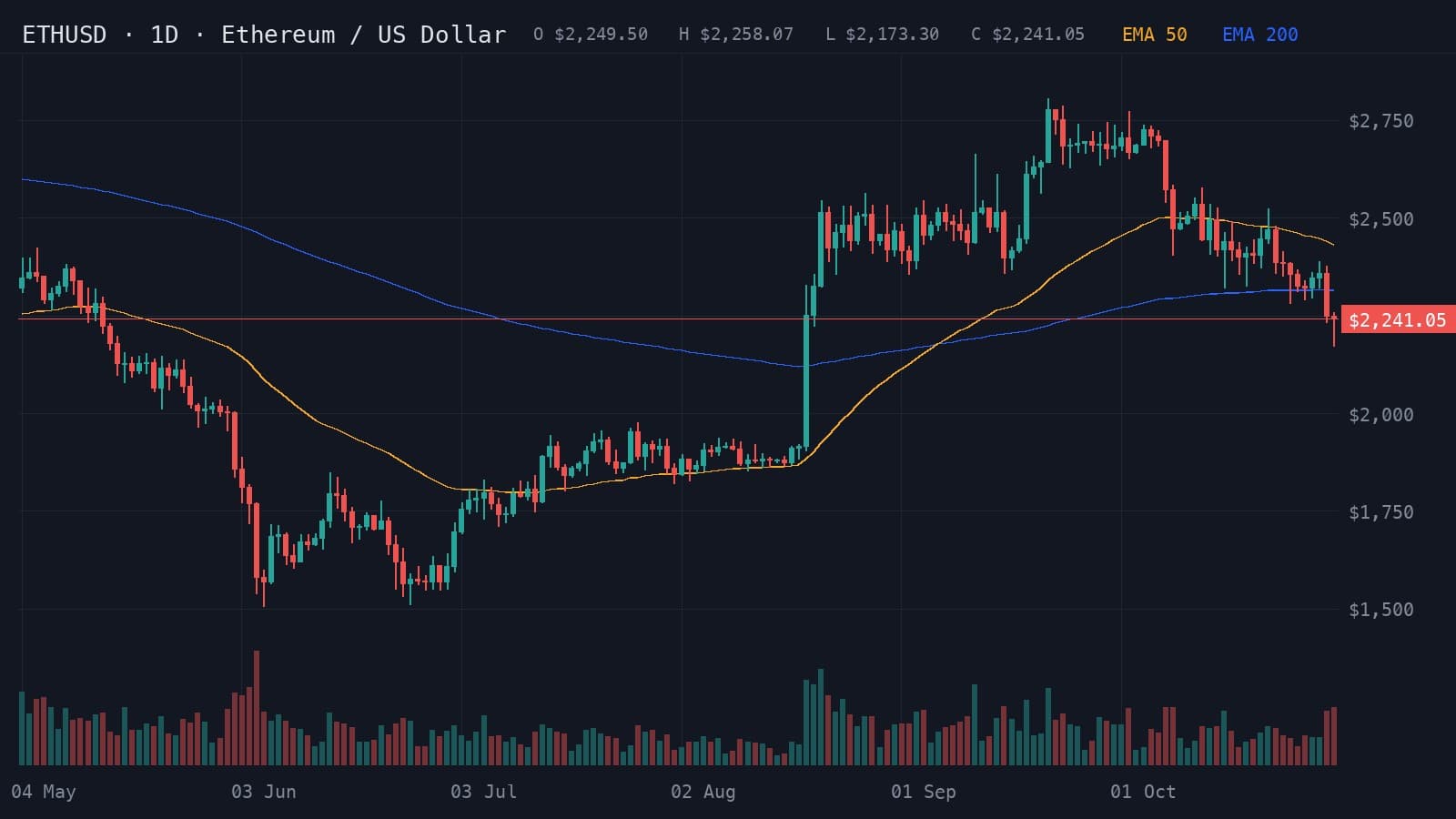
This is the daily ETHUSD chart from May to 30 October 2026 that Wick analyzed. Ether had climbed from a June low near $1,500 to $2,805 on 21 September, then slid back. On 29 and 30 October it closed below the EMA 200 for the first time since mid-August, ending the 30th at $2,241.05.
- Resistance
- $2,400.00
- Support
- $2,173.30
- Stop loss
- $2,250.00
Lower highs and lower lows suggest continued downside while price remains below both moving averages.
Indicators: EMA 50, EMA 200
A daily close above $2,400 could signal a reversal toward $2,560.
- Entry
- >$2,400.00
- Target
- $2,560.00
- Stop
- $2,320.00
- R:R
- 1:2
A daily close below $2,173.30 could open a decline toward $2,020.
- Entry
- <$2,173.30
- Target
- $2,020.00
- Stop
- $2,250.00
- R:R
- 1:2
- Trigger
- Daily close below $2,173
- Entry
- Failed retest near $2,173
- Stop
- Above $2,250
- Target
- $2,020
The read: a descending channel, 66% bearish against 34% bullish, at 78% confidence. Everything hinged on $2,173.30, the last candle's low. Closing a day beneath it would point to $2,020, with the stop above $2,250. The bullish case needed a close back above $2,400, aiming for $2,560 with a stop at $2,320.
At $2,241.05, price sat between the two triggers, so neither plan was live yet. Each one risks about $77 to $80 per ETH to make roughly twice that. With $200 at risk and the short's $76.70 stop, the position would be about 2.6 ETH, since 200 ÷ 76.70 is 2.61. The position size calculator does that sum for any account.
That is the whole decision on one screen: the direction, the level to wait for, the exit if it goes wrong and the target if it goes right. Without it, a trader looking at this chart on 30 October saw a red candle under a moving average and had to guess.
Get this read on your own chart
Wick works on the chart you are looking at right now. Download it, upload a screenshot, and see your levels, both scenarios and the plan before your next trade, not after it.
2. TradingView: best for charting crypto yourself
TradingView is the charting app most crypto traders already know, rated by more than 420,000 people on the US App Store. Besides crypto it charts stocks, currencies and futures, with data from more than 100 exchanges. Its listing highlights Gann fans, Elliott waves and other drawing tools, a scripting language called Pine Script, Bar Replay, paper trading and alerts that run in the cloud. For crypto, that means you can watch BTCUSDT on one exchange next to BTCUSD on another. It comes in 19 languages, and a TradingView screenshot is the easiest chart to give Wick.
3. CoinMarketCap: best for a view of the whole market
CoinMarketCap, with about 173,000 ratings, is where many people check what the market as a whole is doing. According to its listing, it tracks more than 45,000 active markets, compares coins by price, market cap and volume over periods from one hour to all time, and adds watchlists, price alerts, a portfolio tracker, a converter and crypto news. It is available in 21 languages.
CoinGecko is the main alternative, with about 27,000 ratings. Its listing describes data on more than 10,000 coins, crypto categories such as AI coins and memecoins, NFT floor prices and exchange rankings. Its app is in English only.
4. CoinGlass: best for futures positioning
A large share of crypto trading happens in perpetual futures, where leverage can push price hard in one direction. CoinGlass, with about 5,900 ratings, shows that side of the market. Its listing describes open interest, funding rates, liquidations and long/short ratios, liquidation heatmaps, ETF and exchange flows, and alerts, alongside data for stocks and commodities. It is available in 14 languages.
It pairs well with a chart read: Wick gives you the levels, CoinGlass tells you how crowded each side is. If funding is high and open interest keeps rising while price stalls under resistance, longs are crowded, and a drop through support can be sharpened by forced selling.
5. DEX Screener: best for tokens on decentralized exchanges
Many new tokens trade only on decentralized exchanges before any large exchange lists them. DEX Screener, with about 5,500 ratings, tracks that market: according to its listing, real-time charts and trades across more than 60 chains and hundreds of DEXes, screeners filtered by volume, liquidity and market cap, plus watchlists and price alerts. It is only available in English. Thin liquidity is the main risk with these tokens, so check it before reading anything into a chart.
6. CoinStats: best for tracking your portfolio
CoinStats, with about 86,000 ratings, answers the last question: what you own and how it is doing. Its listing describes connections to more than 300 wallets and exchanges, real-time profit and loss with cost basis, AI insights based on your holdings, perpetual futures history next to spot, alerts, news from more than 140 sources and tax exports. It is available in 13 languages. CoinStats tells you how your past trades went; Wick helps you plan the next one.
What about crypto signals and trading bots?
Crypto has more signal channels and automated bots than any other market, from Telegram groups to apps that connect to your exchange and trade for you. They make the decision for you, which is the opposite of what a chart read does. Before trusting one:
- Ask for results tracked by an independent service. Screenshots of winning trades prove nothing.
- Check what the bot can do with your exchange API key. It should never need permission to withdraw.
- Look at the leverage it uses. A strategy that wins a little most days can lose the account in one liquidation.
- Walk away from anyone who promises fixed returns or asks you to send them funds. Both are common signs of a crypto scam.
Wick does not connect to your exchange, send signals or place trades. It does something more lasting: every analysis explains what the chart shows and why, so you get better at reading charts yourself, and the decision always stays with you.
Other AI chart analysis apps
Wick is not the only app that reads chart screenshots. Trade AI, from Leadimize, has the most ratings in the category, about 10,000, and covers stock, forex and crypto charts with patterns, trends and key levels. TradeGPT, from Eversight Studio, names BTC, ETH and SOL among its markets and leans on indicators such as RSI, MACD, Bollinger Bands and Fibonacci. Wick's focus is the trigger: every plan says which candle close has to happen before the trade is on, so you never enter on hope. All three are compared in our roundup of AI chart analysis apps.
- Best AI chart analysis apps for iPhone (2026)The AI chart analysis apps for iPhone compared: Wick, Trade AI, Profit AI, TradeGPT, ChartDetector AI and Chart AI Pro, and whether ChatGPT can do the same.
How to choose
- You need to know what a chart is saying and where a trade would fail: Wick.
- You draw your own levels and want alerts on them: TradingView.
- You want the big picture across thousands of coins: CoinMarketCap or CoinGecko.
- You trade perpetual futures with leverage: check CoinGlass for funding and liquidations.
- You hunt new tokens on-chain: DEX Screener, with extra care.
- You hold coins across several exchanges and wallets: CoinStats.
If you install only one app from this list for your trading, make it the one that reads your chart. The others tell you about the market; Wick tells you what the chart in front of you says and where your trade is wrong.
A complete routine uses several of them: CoinMarketCap for the market's mood, CoinGlass for positioning, a TradingView chart for the setup, Wick for the read, and the position size calculator before you place the order.
Stop guessing: read your next crypto chart with Wick
The next setup on Bitcoin, Ether or Solana is already forming. Open the chart on your exchange or in TradingView, screenshot the timeframe you trade and send it to Wick. Within seconds you will know the levels, the odds on each side, and the candle close that puts the trade on, along with where it is wrong and where it aims. Download Wick and make your next trade a planned one.
Related guides
- How to analyze a Bitcoin (BTC) chart with AIScreenshot your Bitcoin chart, upload it to an AI chart analysis app, and read the trend, levels, scenarios and trade plan. A real 4-hour BTCUSD example.
- Position size calculator for forex, gold, indices and stocksCalculate how many lots or shares to trade from your account size, risk per trade, entry and stop loss. Works for forex, gold, indices, crypto and stocks.
- Best AI chart analysis apps for iPhone (2026)The AI chart analysis apps for iPhone compared: Wick, Trade AI, Profit AI, TradeGPT, ChartDetector AI and Chart AI Pro, and whether ChatGPT can do the same.
Frequently asked questions
What is the best app for crypto analysis?
It depends on the question. For reading a crypto chart we recommend Wick: one screenshot gives you the trend, the levels that matter, upside and downside cases with probabilities, and an entry, stop and target. For drawing charts yourself, TradingView is the standard; for market-wide data, CoinMarketCap; for funding rates and liquidations, CoinGlass.
Can AI analyze crypto charts?
Yes. Wick and similar apps take a screenshot of a Bitcoin, Ether or Solana chart from any exchange or from TradingView, on any timeframe, and set out support and resistance, the pattern and what would confirm a move either way. They read what is on the chart, so news, token unlocks and exchange events are not part of the analysis.
Can an AI bot trade crypto for me?
Bots can place trades through your exchange's API, but none can promise profits, and leverage can turn a losing streak into a liquidation. If you use one, never give it permission to withdraw. Wick never places trades; it reads the chart, and the choice remains yours.
Should I analyze the spot chart or the perpetual futures chart?
Analyze the market you trade. A perpetual contract usually stays close to spot, but the two can separate during fast moves, and their volume differs. Wick reads both, so upload the chart of the contract you hold.
Why do funding rates matter for a chart setup?
Funding is the payment perpetual futures traders make to each other to keep the contract close to spot. When it is high, longs are paying to stay in, a sign the trade is crowded, and a break of support can set off forced selling. Funding data, on CoinGlass for example, adds context a price chart cannot show.
Educational content, not financial advice. Trading involves risk, including the loss of your capital. AI analysis can be wrong; always do your own research. Read the full disclaimer.