
Best AI apps for forex analysis in 2026
The best app for reading a forex chart is Wick. Take a screenshot of EUR/USD, GBP/USD or any other pair in MetaTrader or TradingView and upload it. A few seconds later Wick gives you the trend, support and resistance to the pip, the odds of a move up and a move down, and a plan: the close that has to happen before you enter, then the entry price, the stop and the target. The rest of this list covers the other jobs in a forex trade: TradingView for charting, MetaTrader 4 and 5 for placing orders with your broker, Myfxbook and FXStreet for the economic calendar and news, Easy Currency Strength for which currency is driving a move, and Forex Market Hours for the sessions. Wick turns the pair on your screen into a trade plan.
Five questions behind every forex trade
Each app on this list answers one of these. Know which question you are asking before you open an app:
- What does the chart say? Direction, key levels and pattern for the pair you trade. Wick answers this one.
- What could move the pair today? Central bank decisions and data such as the US jobs report or an inflation release.
- Which currency is doing the work? EUR/USD can rise because the euro is strong or because the dollar is weak, and the answer changes which pairs are worth trading.
- Is the market awake? A pair that crawls through the Asian session can cover 50 pips in the first hour of London.
- Where do I place the order? The trading platform your broker runs.
Most forex apps deal with the last four. The first decides whether you get in at a planned price with your stop already set, or late and on a hunch, and that is where most forex trades are lost.
Where forex trades go wrong
The same mistakes show up in almost every losing forex account:
- Opening a trade minutes before a data release, then watching a 40-pip spike take out the stop.
- Sizing by habit: one lot because the last trade was one lot, whatever the distance to the stop.
- Buying EUR/USD and GBP/USD at the same time, which is often the same bet against the dollar, made twice.
- Stops a few pips from price just before the daily rollover, when spreads widen.
- Taking a 5-minute long while the daily chart is falling.
Leverage magnifies every one of them. They share a cause: an entry made without a written plan. Wick gives you that plan before the order, with the level that has to break first and the price where the idea is proved wrong.
How we chose them
We matched each of those five questions to the strongest app we could find on the US App Store. Features, rating counts and languages come from each app's US listing as it read on 5 November 2026. Individual broker apps are left out: they are where you trade, and MetaTrader covers that job for a large number of brokers.
The apps at a glance
| App | Best for | Question it answers | Key features |
|---|---|---|---|
| Wick | Our pick for reading forex charts | What does the chart say? | Turns a chart screenshot into the trend, levels to the pip, the pattern, bullish and bearish odds, and the full plan, trigger to target |
| TradingView | Charting currency pairs yourself | What does the chart say? | Currency and multi-market charts, drawing tools and indicators, Pine Script, Bar Replay, cloud alerts, economic calendar |
| MetaTrader 4 and 5 | Placing trades with your broker | Where do I place the order? | Connects to hundreds of brokers, pending orders, stop loss and take profit on the chart, 30 indicators, 9 timeframes, demo accounts |
| Myfxbook | Calendar and trader positioning | What could move the pair today? | Economic calendar for 30+ currencies, live rates for 60+ pairs, news, Community Outlook positioning, trade calculators |
| FXStreet | News and analysis | What could move the pair today? | Forex news around the clock, technical analysis of the major pairs and gold, a calendar of 1,000+ events from 42 countries |
| Easy Currency Strength | Finding the strongest and weakest currency | Which currency is doing the work? | Strength of the major currencies from M5 to MN1, a Pairs to Watch list, quick access to the calendar |
| Forex Market Hours | Timing the sessions | Is the market awake? | A clock of the trading sessions, an overlap widget, alerts before markets open or close, holiday schedules |
Some of these apps charge a subscription for alerts, widgets or removing ads, and prices differ from country to country. Read the listing before you pay for one.
1. Wick: our pick for reading forex charts
A forex chart is a wall of decimals on a market that never stops moving. Wick turns it into a decision in seconds. Screenshot the pair in MetaTrader, TradingView or your broker's app and send it over. Wick identifies the trend and the pattern, reads support and resistance off the price axis to the pip, puts a probability on each direction, and lays out the plan for the side with the edge.
It is the discipline most traders wish they had: a read made before the position is open, by something with no position to defend, that always says where the trade fails.
- Levels you can type straight into an order: written the way your platform quotes the pair, such as 1.3500 on GBP/USD.
- No entry on hope: each plan waits for a specific candle close, then gives the entry, the stop, the target and the reward-to-risk ratio.
- Both sides weighed: a bullish and a bearish case with a probability each, so a 55/45 setup never passes for a sure thing.
- Major pairs, crosses and gold, on any timeframe from the 1-minute chart to the weekly.
- Sized in a minute: take the stop from the plan to the position size calculator and get your lot size before you click buy or sell.
- Every analysis goes into your journal. There is no sign-up, and the app speaks six languages.
Worked example: GBP/USD on the 4-hour chart
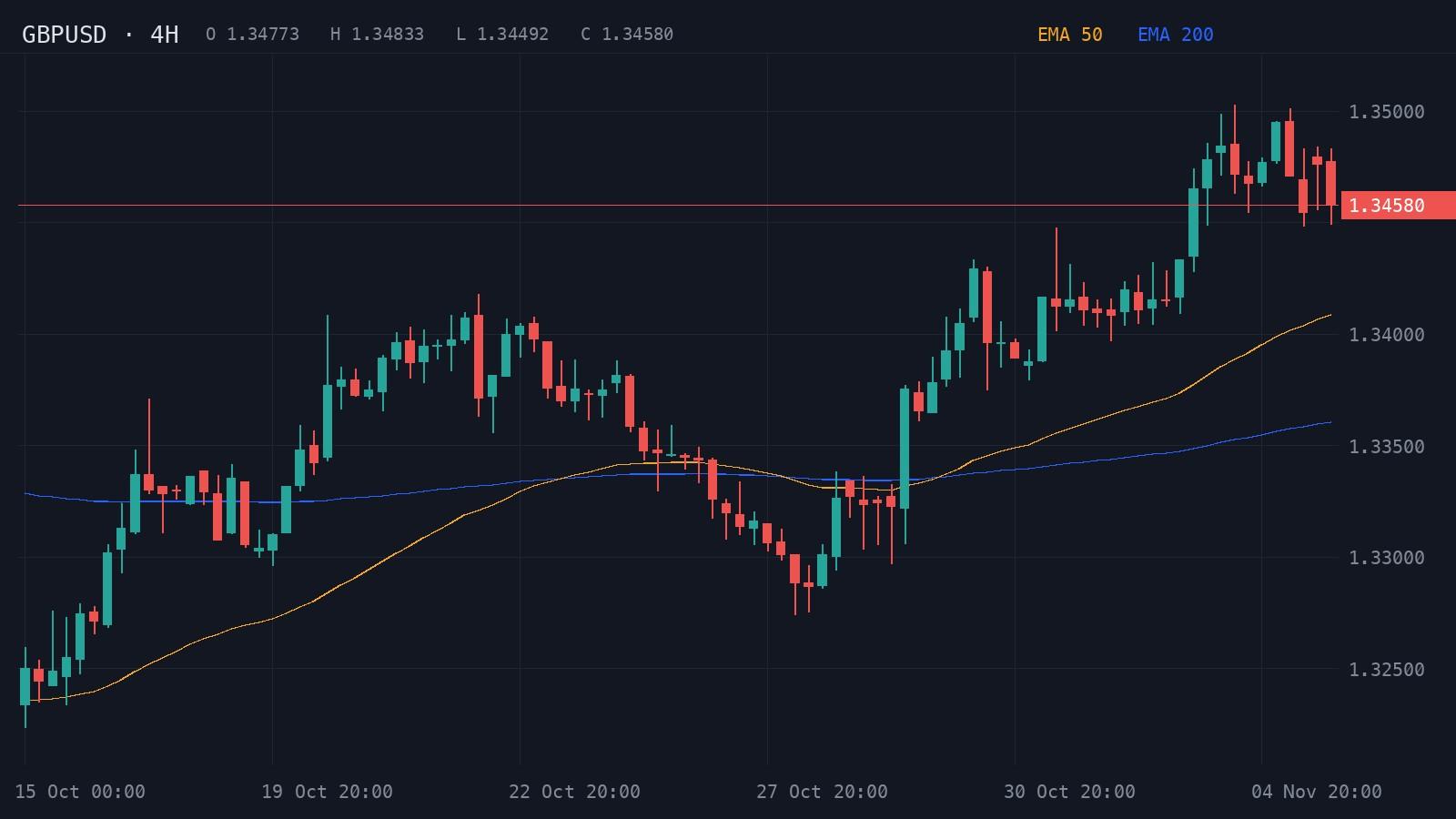
This is the 4-hour GBP/USD chart from 15 October to 5 November 2026 that Wick analyzed. The pound climbed from about 1.3230 to the 1.3500 area. After a pullback to 1.3274 on 28 October it rallied again, and on 30 October the EMA 50 crossed back above the EMA 200. Price reached 1.3500 on 4 and 5 November but never closed a 4-hour candle above it, and the last candle closed at 1.34580.
- Resistance
- 1.3500
- Support
- 1.3440
- Stop loss
- 1.3470
Price is consolidating below 1.3500 after a strong advance, favoring continuation if resistance breaks.
Indicators: EMA 50, EMA 200
A 4H close above 1.3500 could extend the markup toward 1.3570.
- Entry
- >1.3500
- Target
- 1.3570
- Stop
- 1.3470
- R:R
- 1:2.3
A break below 1.3440 could expose the rising averages and 1.3400.
- Entry
- <1.3440
- Target
- 1.3400
- Stop
- 1.3465
- R:R
- 1:1.6
- Trigger
- 4H close above 1.3500
- Entry
- Successful retest near 1.3500
- Stop
- Below 1.3470
- Target
- 1.3570
The read: a bullish consolidation inside an uptrend, 63% bullish against 37% bearish, with 78% confidence. The whole trade turned on 1.3500. A 4-hour close above it would put the long on, entering on a retest of 1.3500 with the stop below 1.3470 and the target at 1.3570: 30 pips of risk for 70 of reward, about 1:2.3. The bearish case needed a break below 1.3440, aiming for 1.3400 with a stop at 1.3465, which is 25 pips of risk for 40 of reward.
At 1.34580 neither trigger had fired, so there was no trade yet. On GBP/USD one standard lot moves about $10 per pip, so the long's 30-pip stop risks $300 per lot. Risking $100 means 0.33 lots, since 100 ÷ 300 is 0.33. The position size calculator works this out for any pair and account.
That is everything a trader needs before the order: which side the odds favor, which close to wait for, where to get out if it fails and where to take profit if it works. Without it, this chart on 5 November was a pair stuck under a round number, and the choice came down to buying the top or selling into an uptrend.
Get this read on the pair you trade
Open the pair you are watching, take a screenshot and send it to Wick. In a few seconds you will have the levels to the pip, the odds on each side and the close that has to happen before you enter. Download Wick and check your next trade with it before you place the order.
2. TradingView: for charting currency pairs yourself
TradingView is where many forex traders draw their charts, with more than 423,000 US App Store ratings. The listing covers currencies alongside stocks, crypto, futures and CFDs, with plenty of drawing tools and indicators, the Pine Script language for custom tools, Bar Replay for rewinding past price action, cloud-based alerts and a calendar of economic events. You can trade from its charts through connected brokers or practice with paper trading. The app is in 19 languages, and its screenshots are among the easiest for Wick to read.
3. MetaTrader 4 and 5: best for placing the trade
MetaTrader is the platform a large number of forex brokers offer, and its two apps have about 82,000 ratings (MetaTrader 4) and 87,000 (MetaTrader 5). According to their listings, both connect to hundreds of brokers and offer the full range of orders including pending orders, stop loss and take profit levels drawn on the chart, 30 indicators, 24 analytical objects such as Fibonacci and Gann tools, and nine timeframes from M1 to MN. MetaTrader 5 adds Depth of Market. Each is in more than 20 languages, and both let you practice on a demo account before risking money.
MetaQuotes makes the software; the account and the prices come from your broker. Wick plans the trade and MetaTrader places it: enter the entry, stop loss and take profit from the plan as one pending order.
4. Myfxbook: best for the calendar and trader positioning
Myfxbook's app is listed as Forex Calendar, Market & News and has about 6,500 ratings. Its listing describes an economic calendar covering more than 30 currencies, where each event opens with an explanation and its past values, live rates for over 60 pairs and commodities, streaming news, price alerts, and calculators for position size, margin and risk. It also has Community Outlook, which shows how Myfxbook's users are positioned on each pair, with alerts when, for example, long positioning passes 50%. Many traders treat a lopsided outlook as a sign that one side is crowded. Its interface is English-only.
Tradays, the calendar app from MetaTrader's maker, is the alternative if you want the calendar in your own language: about 440 ratings, 21 languages and more than 600 indicators from the ten largest economies.
5. FXStreet: best for forex news and analysis
FXStreet, with about 1,300 ratings, works like a news desk for currency traders. Its listing promises forex news around the clock, technical analysis of pairs such as EUR/USD, GBP/USD and USD/JPY and of gold, and an economic calendar with more than 1,000 events from 42 countries, each showing the actual, forecast and previous figures with a volatility rating. Its charts are powered by TradingView, and alerts cover prices, data releases and breaking news. English is the only language offered.
6. Easy Currency Strength: best for finding the strongest and weakest currency
Every pair is two currencies pulling against each other. Easy Currency Strength, with about 510 ratings, shows which of the major currencies are strongest and weakest on timeframes from M5 to MN1, and its Pairs to Watch list highlights the pairs with the widest gap between the two sides. Its own listing advises using strength together with price action, which is exactly where a chart read comes in. It is in English only.
7. Forex Market Hours: best for timing the sessions
Forex trades around the clock from Monday to Friday, but not with the same energy all day. Forex Market Hours, with about 540 ratings, shows the trading sessions on a clock face with countdowns, a widget for the Tokyo-London and London-New York overlaps, alerts before markets open or close, and holiday schedules. It is available in 15 languages. If you also trade gold, our guide to the best time to trade gold has its busiest hours by time zone.
- Best Time to Trade Gold (XAUUSD): Trading Hours by Time ZoneThe best time to trade gold is 8 to 11 a.m. New York time. See when gold moves most, with real hourly data and the hours in India, Pakistan, the UAE and more.
What about forex signals, EAs and copy trading?
Forex has a large market in ready-made decisions: signal channels, expert advisors (EAs) that trade inside MetaTrader, and services that copy another trader's account into yours. They take the decision out of your hands, the reverse of reading the chart yourself. Before you trust one:
- Ask for a live account tracked by an independent service, such as a Myfxbook account with a verified track record. A screenshot of a winning trade is not a track record.
- Look at the drawdown, not only the gain. Martingale and grid systems win a little almost every day by adding to losing trades, until one move erases months of profit.
- Never share your MetaTrader master password. If someone needs to watch your account, the investor password gives read-only access.
- Walk away from promises of fixed monthly returns, and from pressure to deposit with a broker someone else picks for you.
Wick sends no signals, runs no EA and places no trades. Each read spells out the reasoning behind the levels and the odds, so you learn to see the setup yourself, and the trade remains your call.
Other apps that read forex charts with AI
Wick has company. Trade AI, from Leadimize, is the most-rated chart reader with about 10,000 ratings; it lists forex alongside stocks and crypto and picks out patterns, indicators and support and resistance from a single image. TradeGPT, from Eversight Studio, with about 1,300 ratings, names EUR/USD, GBP/USD and USD/JPY among its markets and builds on indicators such as RSI, MACD and Fibonacci levels. Wick is built around the trigger: no plan is live until a named candle closes, so you are never in a trade on hope alone. All three are compared side by side in our roundup of AI chart analysis apps.
- Best AI chart analysis apps for iPhone (2026)The AI chart analysis apps for iPhone compared: Wick, Trade AI, Profit AI, TradeGPT, ChartDetector AI and Chart AI Pro, and whether ChatGPT can do the same.
How to choose
- You want to know what the chart says and where the trade fails: Wick.
- You mark your own levels and want alerts when price gets there: TradingView.
- You need to place the order with your broker: MetaTrader 4 or 5.
- You want to see what is on the calendar today: Myfxbook, FXStreet or Tradays.
- You want to know which currency is driving the move: Easy Currency Strength.
- You want to trade the busiest hours: Forex Market Hours.
If your phone has room for one more trading app, choose the one that reads your chart. The rest describe the market around the trade; Wick tells you whether there is a trade, where it starts and where it is wrong.
A full routine looks like this: check the calendar in Myfxbook or FXStreet, make sure the session is active, pull up the pair in TradingView or MetaTrader, get Wick's read, size it with the position size calculator, then place the order in MetaTrader.
Stop guessing: read your next forex chart with Wick
A new setup on EUR/USD, GBP/USD or gold is forming while you read this. Screenshot the timeframe you trade and upload it to Wick, and in seconds you get the levels to the pip, the odds on both sides and the close that turns the idea into a trade, along with the stop and the target. Download Wick and trade your next pair with a plan.
Related guides
- How to analyze a EUR/USD chart with AIScreenshot your EUR/USD chart from MetaTrader or TradingView, upload it to an AI chart app, and read levels in pips. A real 1-hour example with a trade plan.
- Best ChatGPT prompts for forex trading and analysisCopy-ready ChatGPT prompts for forex trading: chart reads, pip value and lot size, the economic calendar, sessions and spreads, with a real EUR/USD example.
- Position size calculator for forex, gold, indices and stocksCalculate how many lots or shares to trade from your account size, risk per trade, entry and stop loss. Works for forex, gold, indices, crypto and stocks.
- Can AI read a MetaTrader or TradingView screenshot?Yes. What an AI chart app reads from a MetaTrader or TradingView screenshot, how to take one it reads well, and what the analysis gives you back.
- Best AI chart analysis apps for iPhone (2026)The AI chart analysis apps for iPhone compared: Wick, Trade AI, Profit AI, TradeGPT, ChartDetector AI and Chart AI Pro, and whether ChatGPT can do the same.
Frequently asked questions
What is the best app for forex analysis?
It depends on the job. For the chart itself, Wick: a single screenshot returns the trend, levels to the pip, both cases with their odds, plus an entry, a stop and a target. For charting it yourself, TradingView; to place trades with a broker, MetaTrader 4 or 5; for the economic calendar, Myfxbook or FXStreet.
Can AI read a forex chart screenshot?
Yes. Wick reads screenshots of majors, crosses and gold taken in MetaTrader, TradingView or a broker's app, on any timeframe, and writes support, resistance and the plan at pip precision. It only sees the chart, so a surprise rate decision or data release can still override it.
Is there an AI that trades forex for me?
Expert advisors and signal services can trade or decide for you, but no one can guarantee profits, and many hide large drawdowns. Check an independently verified track record before trusting one. Wick does not trade; it reads the chart and leaves the decision with you.
How do I work out the lot size for a forex trade?
Divide the amount you are willing to lose by the stop distance in pips times the pip value of one lot. With a US dollar account on GBP/USD, one standard lot is worth about $10 a pip, so risking $100 with a 30-pip stop gives 100 ÷ (30 × 10) = 0.33 lots. The position size calculator does it for any pair.
Which timeframe should I upload for a forex pair?
Upload the timeframe you plan to trade, then check the one above it. A 15-minute long against a falling 4-hour chart is fighting the bigger trend. Wick handles every timeframe from the 1-minute to the weekly chart.
Educational content, not financial advice. Trading involves risk, including the loss of your capital. AI analysis can be wrong; always do your own research. Read the full disclaimer.